Architecture templates › Serverless API
Serverless API architecture template (AWS)
Free editable serverless API architecture diagram - API gateway, Lambda-style functions, a managed database, object storage and async processing.
Open and edit this diagramStart from a blank canvas
How it works
A serverless architecture replaces servers you manage with managed building blocks that scale to zero. You pay per request and operate far less infrastructure.
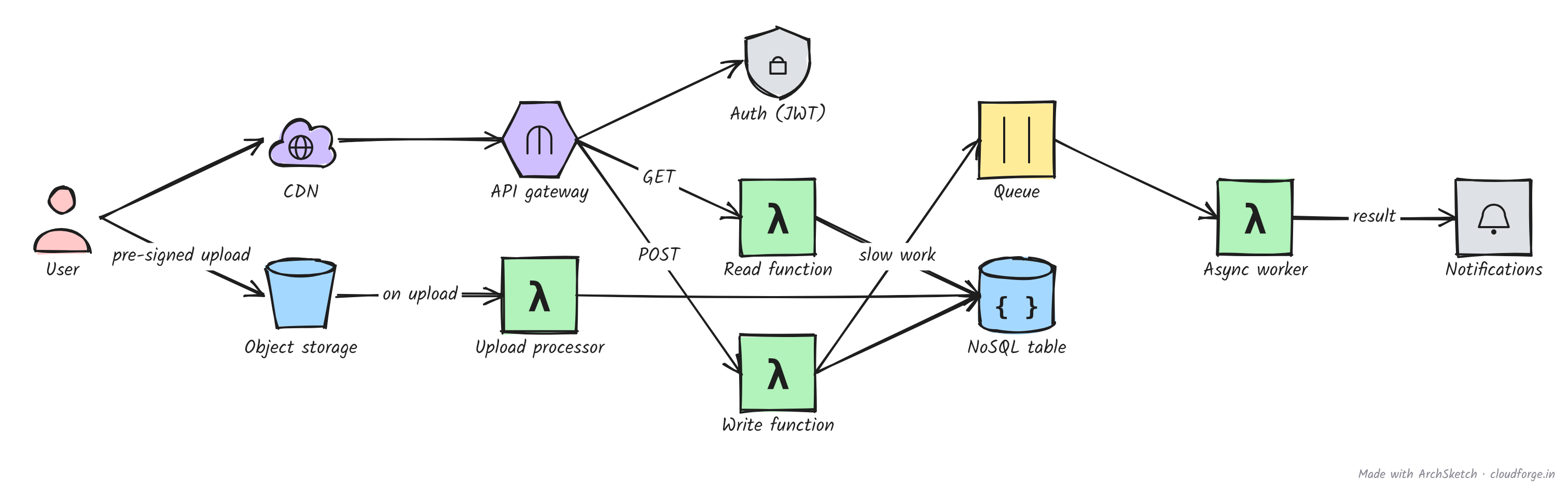
This template shows a typical API - a gateway that authenticates and routes, small functions for each action, a managed NoSQL table and object storage for state, and a queue so slow work happens asynchronously.
Step by step
- Requests arrive via CDN to the API gateway, which validates the token with the auth service.
- Each route invokes a function that reads or writes the managed database.
- File uploads go straight to object storage using pre-signed URLs, which then triggers a processing function.
- Slow tasks are put on a queue and handled by a worker function, with results sent through notifications.
The YAML behind this diagram
Every diagram here is plain text. Paste it into ArchSketch (menu → Diagram from YAML) to edit it, or keep it in your repo next to the code.
nodes:
  - { id: user, kind: user, label: User }
  - { id: cdn, kind: cdn, label: CDN }
  - { id: gw, kind: gateway, label: API gateway }
  - { id: auth, kind: auth, label: Auth (JWT) }
  - { id: get, kind: function, label: Read function, zone: Compute }
  - { id: put, kind: function, label: Write function, zone: Compute }
  - { id: proc, kind: function, label: Upload processor, zone: Compute }
  - { id: job, kind: function, label: Async worker, zone: Compute }
  - { id: table, kind: nosql, label: NoSQL table, zone: Data }
  - { id: files, kind: bucket, label: Object storage, zone: Data }
  - { id: q, kind: queue, label: Queue }
  - { id: notify, kind: notify, label: Notifications }
links:
  - user -> cdn
  - cdn -> gw
  - gw -> auth
  - gw -> get : GET
  - gw -> put : POST
  - get -> table
  - put -> table
  - put -> q : slow work
  - q -> job
  - job -> notify : result
  - user -> files : pre-signed upload
  - files -> proc : on upload
  - proc -> table
Use it in your README
Commit your own arch.yaml and embed the always-up-to-date picture:
