Architecture templates › Multi-tenant SaaS
Multi-tenant SaaS architecture template
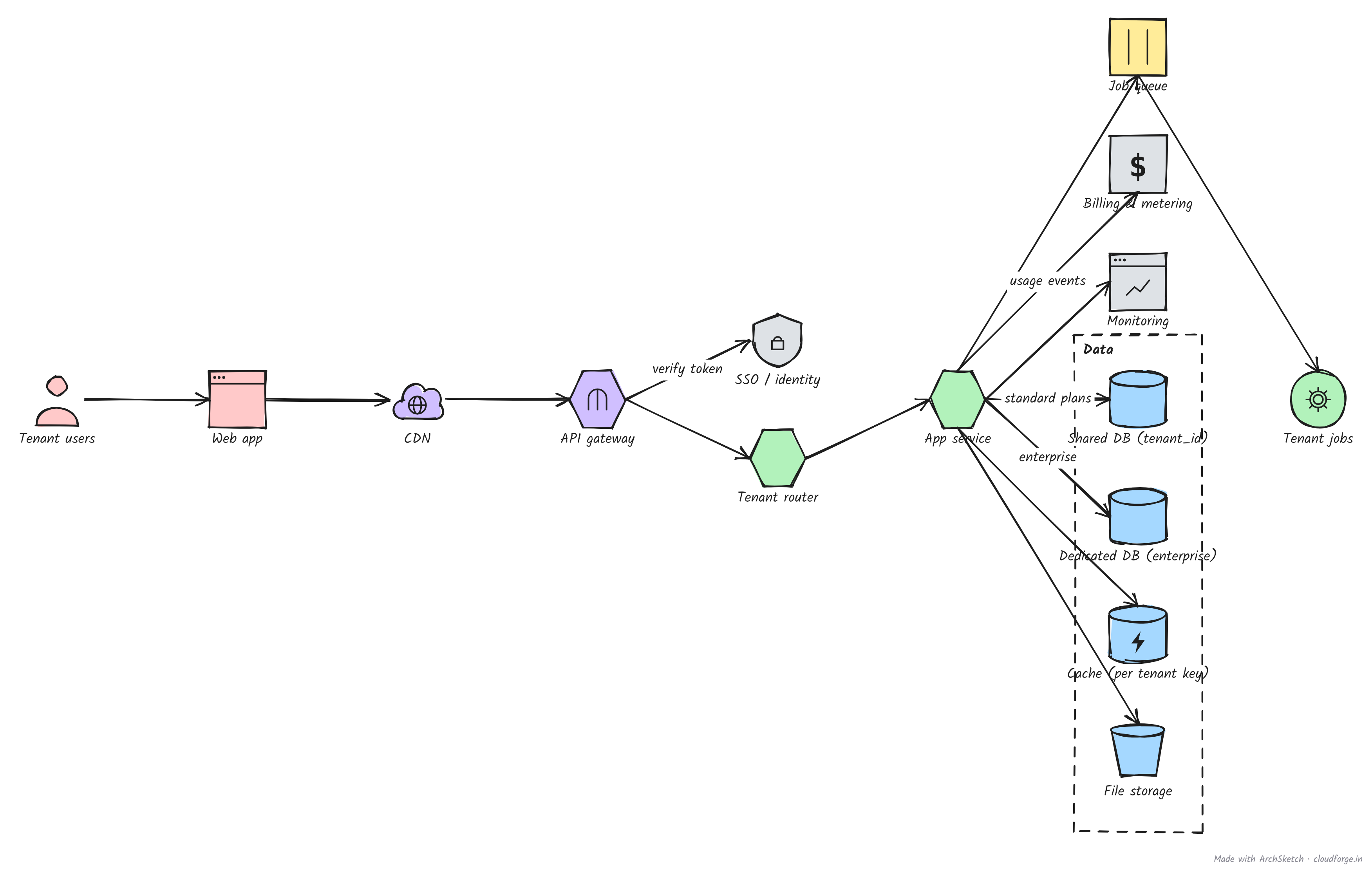
Free editable multi-tenant SaaS architecture diagram - tenant routing, shared and dedicated databases, per-tenant caching, billing and background jobs.
Open and edit this diagramStart from a blank canvas
How it works
A multi-tenant SaaS serves many customers from one deployment. The main design choice is isolation - how strictly each tenant's data is separated from the others, balanced against cost.
This template uses a common hybrid. Most tenants share one database and are separated by a tenant id on every row, while large or regulated customers get a dedicated database. A tenant router resolves who is calling and sends the request to the right data store.
Step by step
- Users sign in through SSO; the token carries the tenant id.
- The tenant router reads the tenant id and picks the database - shared for standard plans, dedicated for enterprise.
- The app service always filters by tenant id, and caches are keyed by tenant id too.
- Background workers run per-tenant jobs (exports, imports, emails); billing meters usage per tenant.
The YAML behind this diagram
Every diagram here is plain text. Paste it into ArchSketch (menu → Diagram from YAML) to edit it, or keep it in your repo next to the code.
nodes:
  - { id: users, kind: user, label: Tenant users }
  - { id: web, kind: web, label: Web app }
  - { id: cdn, kind: cdn, label: CDN }
  - { id: gw, kind: gateway, label: API gateway }
  - { id: sso, kind: auth, label: SSO / identity }
  - { id: router, kind: service, label: Tenant router }
  - { id: app, kind: service, label: App service }
  - { id: shared, kind: sql, label: Shared DB (tenant_id), zone: Data }
  - { id: dedicated, kind: sql, label: Dedicated DB (enterprise), zone: Data }
  - { id: cache, kind: cache, label: Cache (per tenant key), zone: Data }
  - { id: files, kind: bucket, label: File storage, zone: Data }
  - { id: q, kind: queue, label: Job queue }
  - { id: worker, kind: worker, label: Tenant jobs }
  - { id: bill, kind: payment, label: Billing & metering }
  - { id: mon, kind: monitor, label: Monitoring }
links:
  - users -> web
  - web -> cdn
  - cdn -> gw
  - gw -> sso : verify token
  - gw -> router
  - router -> app
  - app -> shared : standard plans
  - app -> dedicated : enterprise
  - app -> cache
  - app -> files
  - app -> q
  - q -> worker
  - app -> bill : usage events
  - app -> mon
Use it in your README
Commit your own arch.yaml and embed the always-up-to-date picture:
