Architecture templates › Microservices
Microservices architecture template
Free editable microservices architecture diagram - API gateway, independent services with their own databases, an event bus, and observability.
Open and edit this diagramStart from a blank canvas
How it works
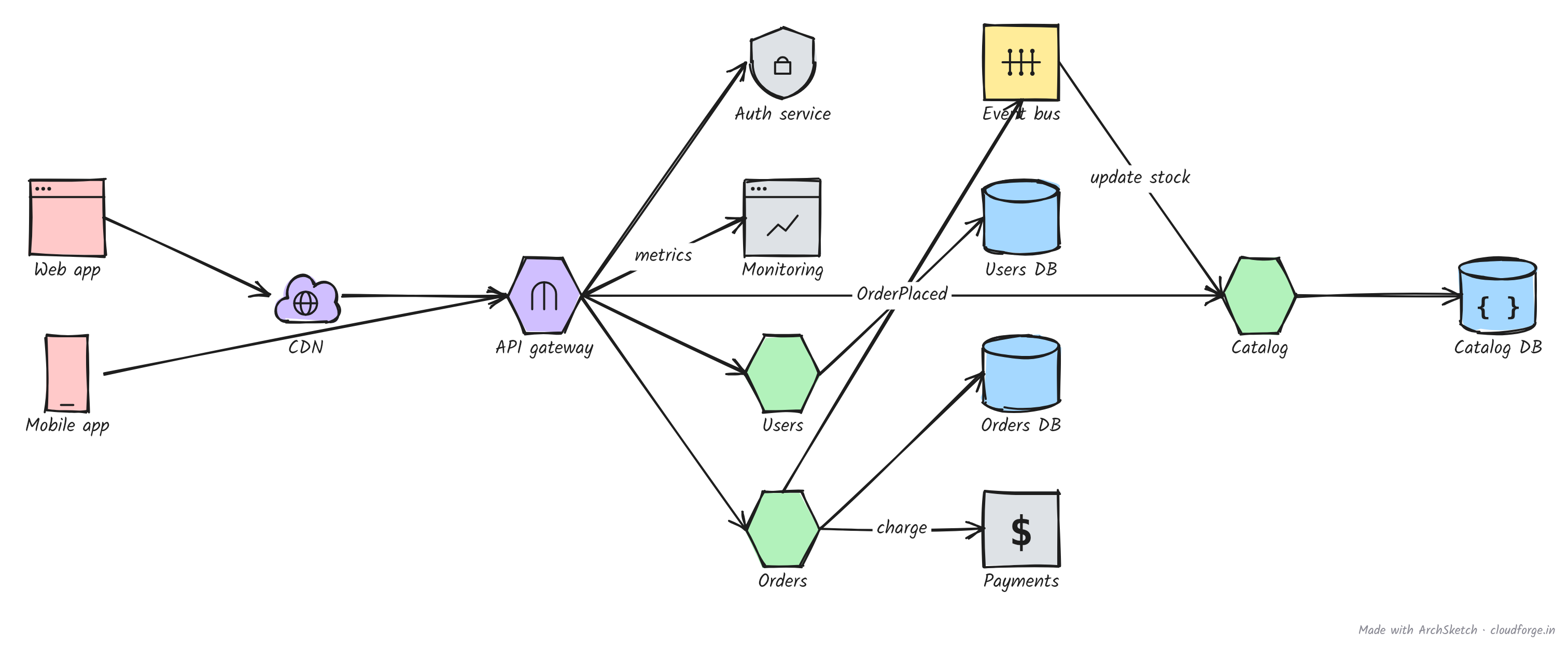
This template shows the standard shape of a microservices system - one entry point (an API gateway), several small services that each own their data, and an event bus for communication that does not need an immediate answer.
Keeping a database per service is the rule that makes the architecture work - services stay independently deployable, and changes to one schema cannot break another service. Use it as a starting point and rename the services to match your domain.
Step by step
- Clients reach every service through the API gateway, which handles routing, rate limits and authentication.
- Each service stores data in its own database and never reads another service's tables directly.
- Services publish domain events (OrderPlaced, PaymentCaptured) to the event bus; interested services subscribe.
- Metrics, logs and traces from every service go to a shared monitoring stack.
The YAML behind this diagram
Every diagram here is plain text. Paste it into ArchSketch (menu → Diagram from YAML) to edit it, or keep it in your repo next to the code.
nodes:
  - { id: web, kind: web, label: Web app }
  - { id: mobile, kind: mobile, label: Mobile app }
  - { id: cdn, kind: cdn, label: CDN }
  - { id: gw, kind: gateway, label: API gateway }
  - { id: auth, kind: auth, label: Auth service }
  - { id: users, kind: service, label: Users, zone: Services }
  - { id: orders, kind: service, label: Orders, zone: Services }
  - { id: catalog, kind: service, label: Catalog, zone: Services }
  - { id: pay, kind: payment, label: Payments, zone: Services }
  - { id: usersdb, kind: sql, label: Users DB, zone: Data }
  - { id: ordersdb, kind: sql, label: Orders DB, zone: Data }
  - { id: catalogdb, kind: nosql, label: Catalog DB, zone: Data }
  - { id: bus, kind: eventbus, label: Event bus }
  - { id: mon, kind: monitor, label: Monitoring }
links:
  - web -> cdn
  - mobile -> gw
  - cdn -> gw
  - gw -> auth
  - gw -> users
  - gw -> orders
  - gw -> catalog
  - users -> usersdb
  - orders -> ordersdb
  - catalog -> catalogdb
  - orders -> pay : charge
  - orders -> bus : OrderPlaced
  - bus -> catalog : update stock
  - gw -> mon : metrics
Use it in your README
Commit your own arch.yaml and embed the always-up-to-date picture:
