Architecture gallery › Chat messaging
WhatsApp-style chat messaging architecture
How a chat system delivers messages in real time - persistent connections, presence, offline queues, push notifications and media storage.
Open and edit this diagramStart from a blank canvas
How it works
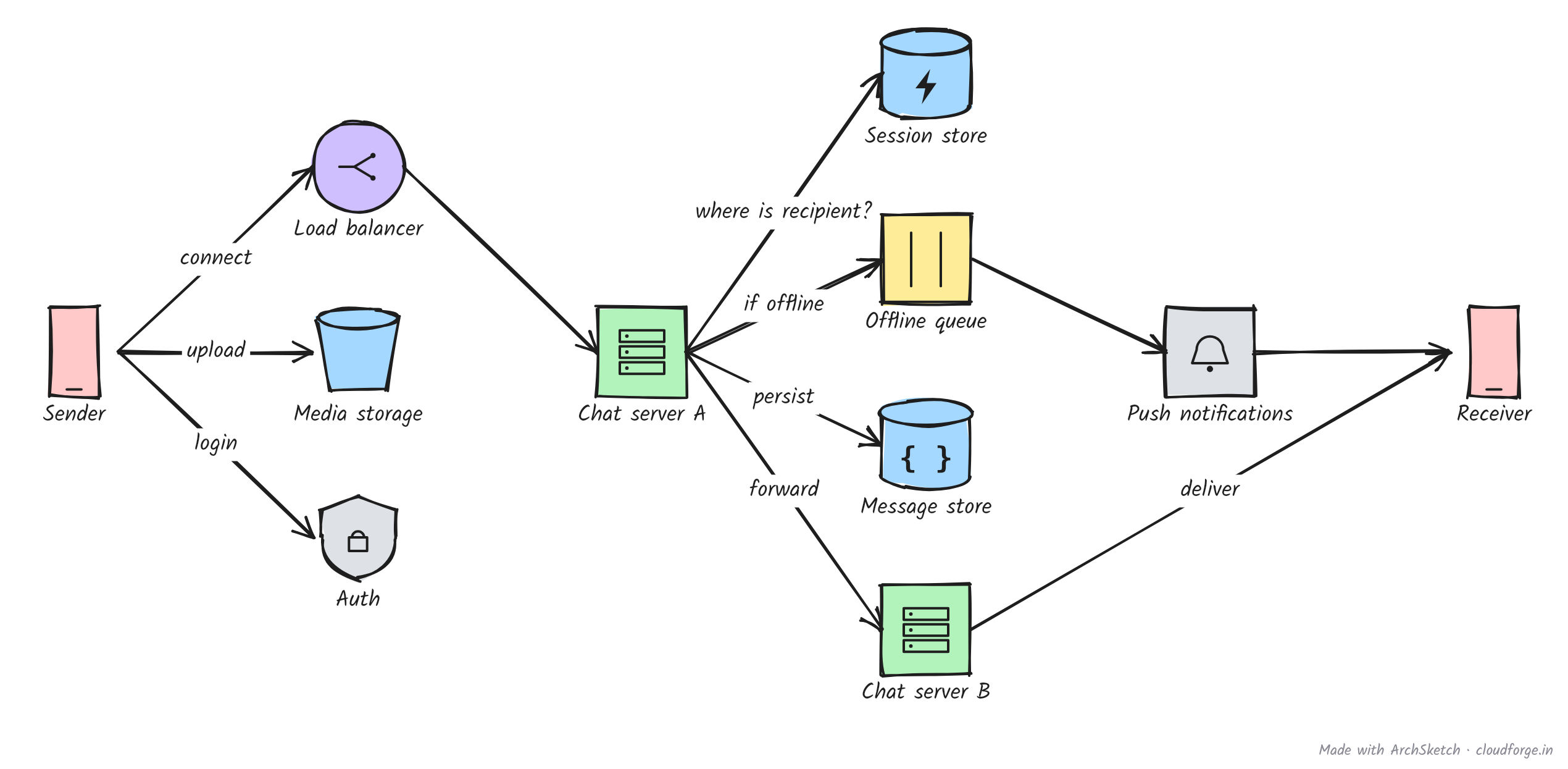
A chat system is built around long-lived connections. Each online device keeps a persistent connection (WebSocket or a custom protocol) to a chat server, so messages can be pushed instantly without polling.
The hard parts are routing and delivery guarantees. A session store records which server each user is connected to, so a message can be forwarded to the right place. If the recipient is offline, the message waits in a queue and a push notification wakes the device.
Step by step
- The sender's app sends a message over its persistent connection to a chat server.
- The chat server looks up the recipient in the session store.
- If the recipient is online, the message is forwarded to their chat server and delivered over their connection.
- If offline, the message is stored in an offline queue and a push notification is sent. On reconnect the queue is drained.
- Photos and videos are uploaded to object storage; the chat message carries only a reference.
The YAML behind this diagram
Every diagram here is plain text. Paste it into ArchSketch (menu → Diagram from YAML) to edit it, or keep it in your repo next to the code.
nodes:
  - { id: sender, kind: mobile, label: Sender }
  - { id: receiver, kind: mobile, label: Receiver }
  - { id: lb, kind: lb, label: Load balancer }
  - { id: chat1, kind: server, label: Chat server A, zone: Chat cluster }
  - { id: chat2, kind: server, label: Chat server B, zone: Chat cluster }
  - { id: sessions, kind: cache, label: Session store }
  - { id: offline, kind: queue, label: Offline queue }
  - { id: msgdb, kind: nosql, label: Message store }
  - { id: push, kind: notify, label: Push notifications }
  - { id: media, kind: bucket, label: Media storage }
  - { id: auth, kind: auth, label: Auth }
links:
  - sender -> lb : connect
  - lb -> chat1
  - sender -> auth : login
  - chat1 -> sessions : where is recipient?
  - chat1 -> chat2 : forward
  - chat2 -> receiver : deliver
  - chat1 -> offline : if offline
  - offline -> push
  - push -> receiver
  - chat1 -> msgdb : persist
  - sender -> media : upload
Use it in your README
Commit your own arch.yaml and embed the always-up-to-date picture:
