Architecture gallery › URL shortener
URL shortener architecture (bit.ly style)
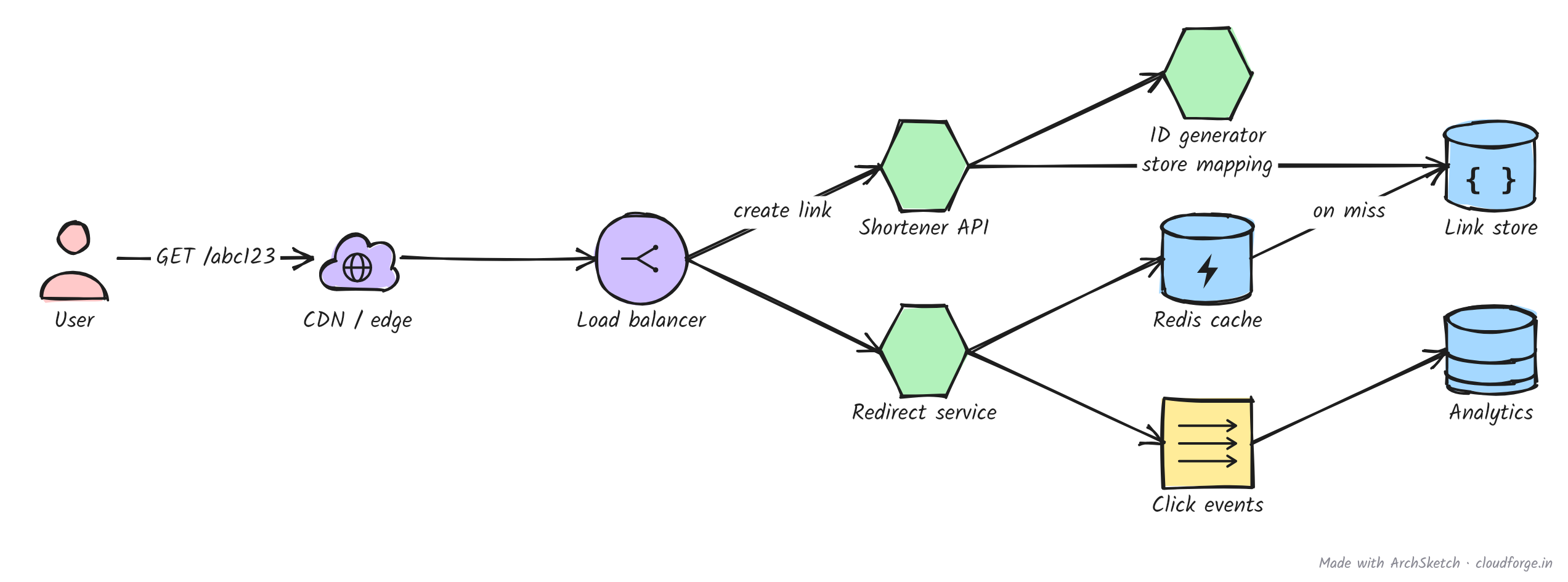
A scalable URL shortener design - unique ID generation, a read-heavy redirect path with caching, and click analytics via an event stream.
Open and edit this diagramStart from a blank canvas
How it works
A URL shortener looks trivial but is a classic system design exercise because it is extremely read-heavy. Creating a short link is rare; following one happens constantly, and must be fast.
The design separates the two paths. The write path generates a unique short code and stores the mapping. The read path serves redirects from a cache in front of a key-value store, and records each click asynchronously so analytics never slows a redirect down.
Step by step
- Creating a link calls the shortener API, which asks the ID generator for a unique code and stores code to URL in the database.
- Following a link hits the CDN or load balancer, then the redirect service, which checks the cache first and the database on a miss.
- The redirect service responds with an HTTP 301/302 and emits a click event to a stream.
- A stream consumer aggregates clicks into the analytics warehouse.
The YAML behind this diagram
Every diagram here is plain text. Paste it into ArchSketch (menu → Diagram from YAML) to edit it, or keep it in your repo next to the code.
nodes:
  - { id: user, kind: user, label: User }
  - { id: cdn, kind: cdn, label: CDN / edge }
  - { id: lb, kind: lb, label: Load balancer }
  - { id: api, kind: service, label: Shortener API }
  - { id: idgen, kind: service, label: ID generator }
  - { id: redirect, kind: service, label: Redirect service }
  - { id: cache, kind: cache, label: Redis cache }
  - { id: db, kind: nosql, label: Link store }
  - { id: clicks, kind: stream, label: Click events }
  - { id: dw, kind: warehouse, label: Analytics }
links:
  - user -> cdn : GET /abc123
  - cdn -> lb
  - lb -> redirect
  - redirect -> cache
  - cache -> db : on miss
  - redirect -> clicks
  - clicks -> dw
  - lb -> api : create link
  - api -> idgen
  - api -> db : store mapping
Use it in your README
Commit your own arch.yaml and embed the always-up-to-date picture:
