Architecture gallery › Social timeline
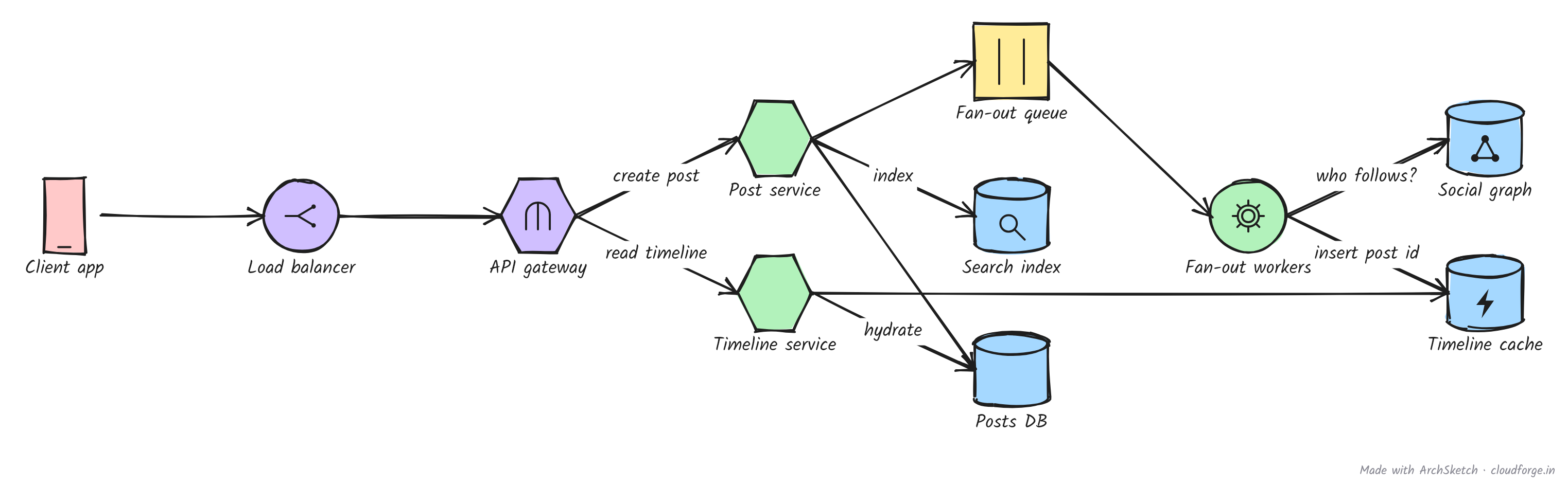
Twitter-style home timeline architecture (fan-out on write)
How a social feed serves a home timeline fast - fan-out on write into per-user timeline caches, a social graph, and a search index.
Open and edit this diagramStart from a blank canvas
How it works
A home timeline is read far more often than it is written, so the classic design does the expensive work when a post is created. This is called fan-out on write - the post is copied into a precomputed timeline for every follower, so reading a timeline is a single cache lookup.
The trade-off is accounts with millions of followers. Writing millions of copies per post is too costly, so large accounts are usually handled at read time and merged into the timeline when it is requested.
Step by step
- A user posts. The post service stores it durably and puts a job on a fan-out queue.
- Fan-out workers look up the author's followers in the social graph and insert the post id into each follower's timeline cache.
- The post is also sent to the search index so it can be found.
- When a follower opens the app, the timeline service reads their precomputed timeline from cache and hydrates the posts.
The YAML behind this diagram
Every diagram here is plain text. Paste it into ArchSketch (menu → Diagram from YAML) to edit it, or keep it in your repo next to the code.
nodes:
  - { id: client, kind: mobile, label: Client app }
  - { id: lb, kind: lb, label: Load balancer }
  - { id: gw, kind: gateway, label: API gateway }
  - { id: post, kind: service, label: Post service }
  - { id: postdb, kind: sql, label: Posts DB }
  - { id: q, kind: queue, label: Fan-out queue }
  - { id: fan, kind: worker, label: Fan-out workers }
  - { id: graph, kind: graphdb, label: Social graph }
  - { id: search, kind: search, label: Search index }
  - { id: tl, kind: service, label: Timeline service }
  - { id: tlcache, kind: cache, label: Timeline cache }
links:
  - client -> lb
  - lb -> gw
  - gw -> post : create post
  - post -> postdb
  - post -> q
  - q -> fan
  - fan -> graph : who follows?
  - fan -> tlcache : insert post id
  - post -> search : index
  - gw -> tl : read timeline
  - tl -> tlcache
  - tl -> postdb : hydrate
Use it in your README
Commit your own arch.yaml and embed the always-up-to-date picture:
