Architecture gallery › RAG pipeline
Retrieval-augmented generation (RAG) pipeline architecture
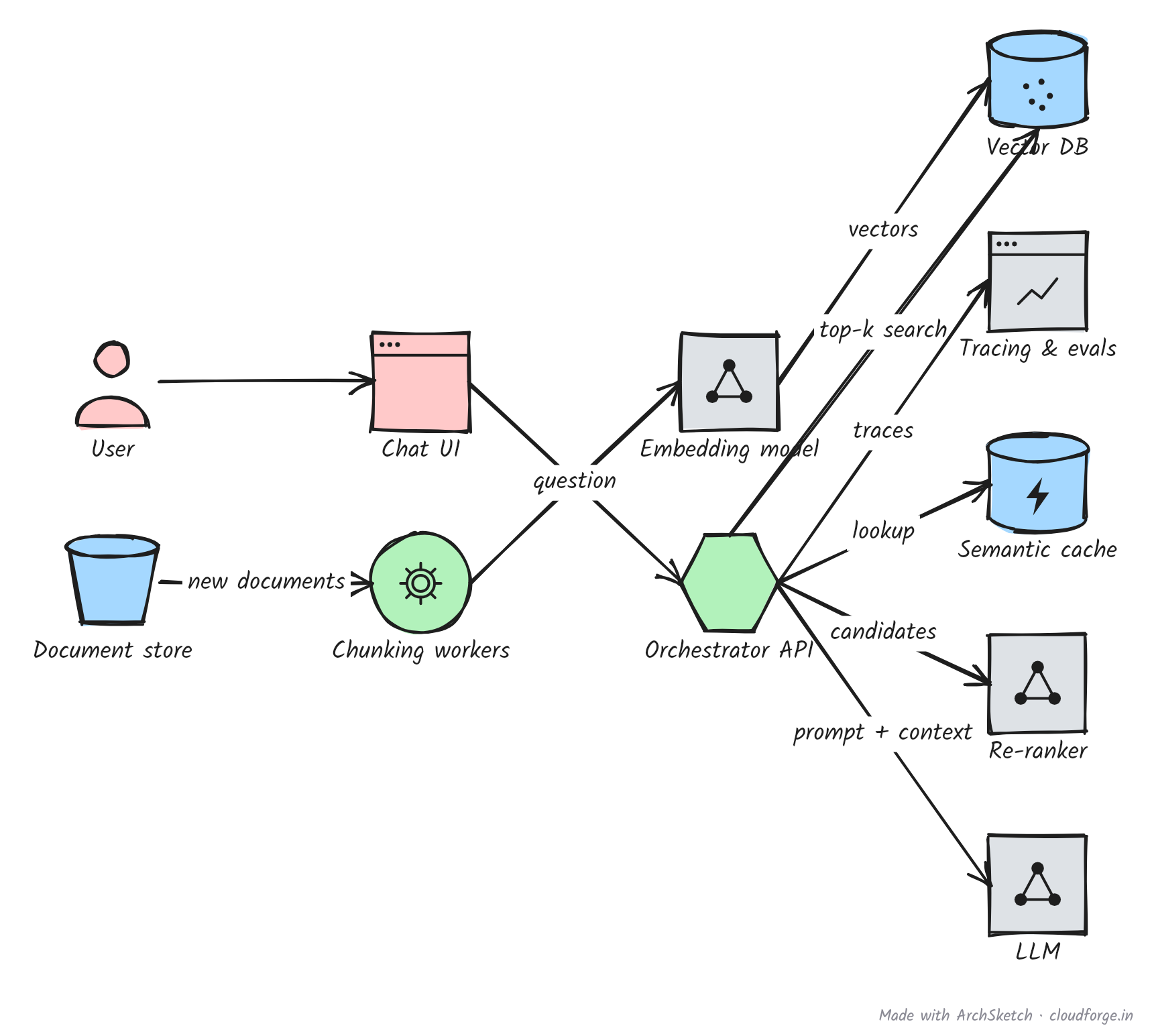
A typical RAG architecture - ingest and embed documents into a vector database, retrieve and re-rank at question time, then ground an LLM answer in the results.
Open and edit this diagramStart from a blank canvas
How it works
Retrieval-augmented generation lets a language model answer questions about data it was never trained on. Instead of fine-tuning, you keep your documents in a searchable store and put the most relevant passages into the prompt at question time.
There are two flows. Ingestion runs offline - documents are split into chunks, each chunk is embedded as a vector, and the vectors are stored in a vector database. Query time runs per question - embed the question, fetch the closest chunks, optionally re-rank them with a stronger model, and ask the LLM to answer using only that context.
Step by step
- Ingestion workers read documents from storage, split them into chunks and send them to the embedding model.
- The resulting vectors and their source metadata are written to the vector database.
- At question time the orchestrator checks a semantic cache, then embeds the question and searches the vector database for the top-k chunks.
- A re-ranker reorders the candidates; the best few are placed in the prompt for the LLM.
- Every step is traced so retrieval quality and answer quality can be evaluated and improved.
The YAML behind this diagram
Every diagram here is plain text. Paste it into ArchSketch (menu → Diagram from YAML) to edit it, or keep it in your repo next to the code.
nodes:
  - { id: user, kind: user, label: User }
  - { id: ui, kind: web, label: Chat UI }
  - { id: api, kind: service, label: Orchestrator API, zone: Query time }
  - { id: cache, kind: cache, label: Semantic cache, zone: Query time }
  - { id: rerank, kind: ml, label: Re-ranker, zone: Query time }
  - { id: llm, kind: ml, label: LLM, zone: Query time }
  - { id: docs, kind: bucket, label: Document store, zone: Ingestion }
  - { id: ingest, kind: worker, label: Chunking workers, zone: Ingestion }
  - { id: embed, kind: ml, label: Embedding model, zone: Ingestion }
  - { id: vdb, kind: vector, label: Vector DB }
  - { id: trace, kind: monitor, label: Tracing & evals }
links:
  - docs -> ingest : new documents
  - ingest -> embed : chunks
  - embed -> vdb : vectors
  - user -> ui
  - ui -> api : question
  - api -> cache : lookup
  - api -> vdb : top-k search
  - api -> rerank : candidates
  - api -> llm : prompt + context
  - api -> trace : traces
Use it in your README
Commit your own arch.yaml and embed the always-up-to-date picture:
