Architecture gallery › Netflix streaming
Netflix streaming architecture
How a Netflix-style streaming service works - a control plane for browsing and playback, and a CDN data plane that delivers the video. Editable diagram.
Open and edit this diagramStart from a blank canvas
How it works
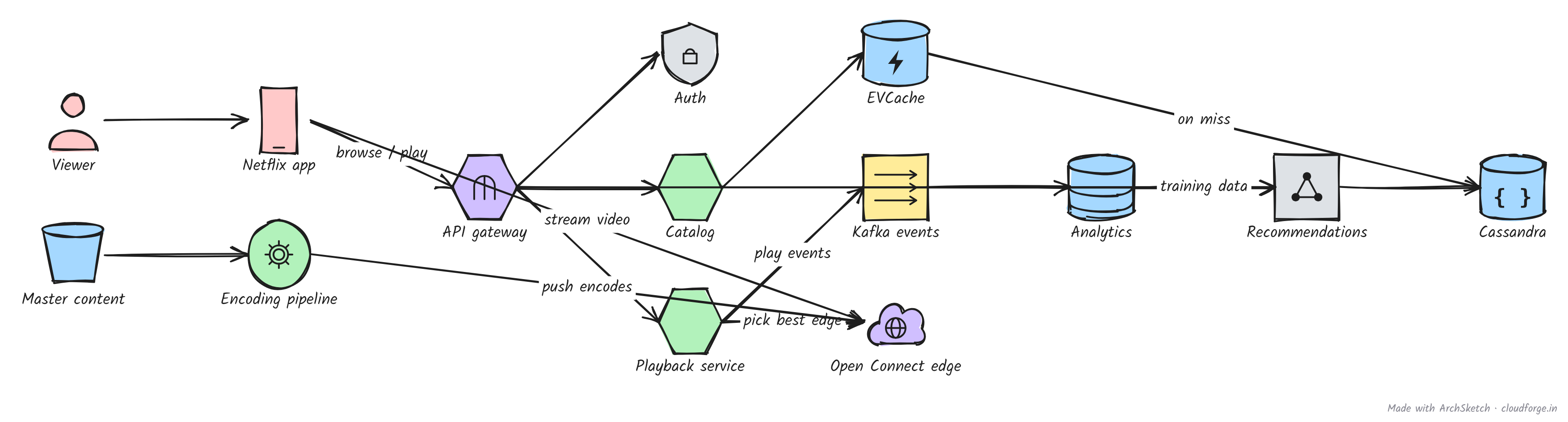
Netflix splits its system in two. The control plane (everything that happens before you press play - login, browsing, recommendations, choosing a stream) runs as many small services in the cloud. The data plane is the video itself, served from Open Connect appliances placed inside or next to ISP networks.
The key idea is that the heavy traffic, the video bytes, never touches the cloud services. The playback service only decides which edge server is best for you and hands your device a URL. Everything else - catalog, recommendations, billing - can scale independently.
Step by step
- The app calls the API gateway to browse. Catalog and recommendation services answer, backed by an in-memory cache (EVCache) in front of Cassandra.
- When you press play, the playback service checks your plan and picks the best Open Connect edge server for your network.
- The app streams video directly from that edge server. Source masters are encoded into many bitrates offline and pushed to the edges ahead of demand.
- Playback and viewing events flow through Kafka into analytics, which trains the recommendation models.
The YAML behind this diagram
Every diagram here is plain text. Paste it into ArchSketch (menu → Diagram from YAML) to edit it, or keep it in your repo next to the code.
nodes:
  - { id: viewer, kind: user, label: Viewer }
  - { id: app, kind: mobile, label: Netflix app }
  - { id: gw, kind: gateway, label: API gateway, zone: Control plane (cloud) }
  - { id: auth, kind: auth, label: Auth, zone: Control plane (cloud) }
  - { id: catalog, kind: service, label: Catalog, zone: Control plane (cloud) }
  - { id: rec, kind: ml, label: Recommendations, zone: Control plane (cloud) }
  - { id: playback, kind: service, label: Playback service, zone: Control plane (cloud) }
  - { id: evcache, kind: cache, label: EVCache, zone: Control plane (cloud) }
  - { id: cass, kind: nosql, label: Cassandra, zone: Control plane (cloud) }
  - { id: kafka, kind: stream, label: Kafka events, zone: Control plane (cloud) }
  - { id: dw, kind: warehouse, label: Analytics, zone: Control plane (cloud) }
  - { id: masters, kind: bucket, label: Master content }
  - { id: encode, kind: worker, label: Encoding pipeline }
  - { id: oca, kind: cdn, label: Open Connect edge, zone: Data plane (video) }
links:
  - viewer -> app
  - app -> gw : browse / play
  - gw -> auth
  - gw -> catalog
  - gw -> rec
  - gw -> playback
  - catalog -> evcache
  - evcache -> cass : on miss
  - rec -> cass
  - playback -> oca : pick best edge
  - app -> oca : stream video
  - masters -> encode
  - encode -> oca : push encodes
  - playback -> kafka : play events
  - kafka -> dw
  - dw -> rec : training data
Use it in your README
Commit your own arch.yaml and embed the always-up-to-date picture:
